BlipBlurb
A beautifully simple, multi-message announcement & notification bar plugin for WordPress. Everything you need — and nothing you don’t.
No annoying ads. No subscriptions.

Features
Bar Settings
- Position (top or bottom) and height
- Sticky (pinned to the viewport, with adjustable offset)
- Floating (inset from the page edges, with adjustable corner radius and distance)
- Global border weight and style; color is set per Blip
Typography
- Font family, size, and letter spacing
- Bold / italic / underlined action prompt
- Configurable divider between a Blip’s message and its action prompt (em dash, en dash, pipe, bullet, arrow, a custom character or none)
Animations
- Multi-Blip rotation interval
- Independent text and background transitions (fade, blur, scale, slide in any direction, or none)
Navigation
- Optional prev/next arrows with configurable size, color, glyph, hover effect (grow/shrink/move), and background pill (color, opacity, shape)
Per-Blip Options
- On/off switch to pause a Blip without deleting it — prioritized over scheduling, regardless of date range
- Independent background, message, action prompt, and divider color assignment
- Optional background gradient and angle
- Optional border color (when bar border is on)
- Independent message and action prompt text
- Destination URL (a full external URL, or a root-relative link to a page on the same site) and link target
- Reorder by dragging or with up/down controls
- Duplicate and delete buttons
Pro Features
Bar Effects
- Elevation shadow
- Background opacity and blur for a glassy look
Scheduling
- Optional start/end date range per Blip
- End date optional for an open-ended Blip
- A “starts in…” / “ended… ago” indicator on the card reflects unsaved edits immediately, not just what’s currently published
Analytics
- Per-Blip impression and click counts, shown right on each Blip’s card, with a one-click reset — approximate by design (a visitor with JS disabled or an ad blocker isn’t counted), not a full analytics suite
- Also pushes
blip_impressionandblip_clickevents towindow.dataLayer, so any site already running Google Tag Manager or GA4 picks them up with no extra configuration
Import / ExportPro
- Export Bar Settings and all Blips to a JSON file
- Import replaces the current configuration
Additional mobile responsive controlPro
Admin
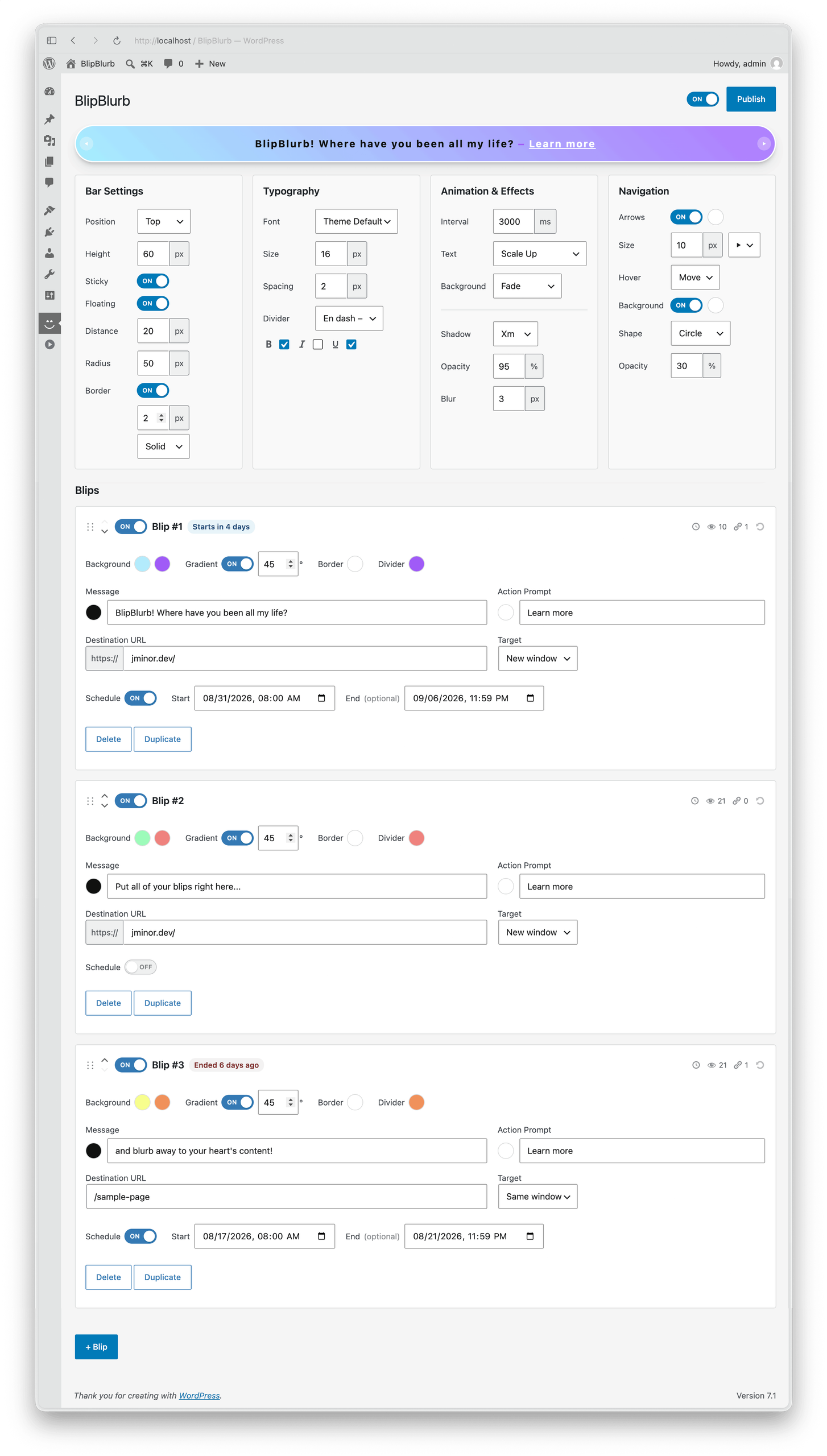
Admin follows WordPress’s own native design system; standard form controls, the site’s admin color scheme, and dashicons — so it looks and behaves like part of wp-admin (sometimes a little nicer) and not a bolted-on interface.
Every setting above lives on one screen, with a live preview that updates global settings as you edit, no publish required.
Installation
- Upload the plugin .zip from WordPress admin.
- Activate BlipBlurb.
- Go to the BlipBlurb menu item to configure the bar and + Blips.
License
BlipBlurb is commercial software, not open source. In short, a purchase lets you use it on one production site (including a client’s, if you’re installing it for them) plus one staging/development copy of that same site, but not resell, redistribute, or publish the source. See license for the full terms.

Payments & licensing securely processed by Freemius.